
Table of Contents
If AI can write the requirements, what is the analyst for?Business analysts used an AI tool built for software developers. They were not there to become developers. They were there to become something else: the AI analyst — a business analyst who works with agents and can defend what comes out of them. The hard question: if an agent can draft the work, what is left for the AI analyst to do?
A team of business analysts at Mosaic, an independent New Zealand consultancy to the financial services sector, took a course inside Cursor, a working tool made for engineers. Cursor was just the place we used; the same course runs in other AI tools. None of the analysts wanted to become a coder.
The group already used AI a lot. They were curious, and they were careful. They did not only learn a new tool; they tested what agentic AI can really do in real client work.
The hard question of the week was this. If an agent can draft a requirement, build a screen and write a document, what can only an analyst do?
The answer they found is simple. An agent can make useful files faster. The AI analyst's real value is judgement, context, clear thinking and real work experience. Those are the things that turn AI output into a good business result.
This article explains what the course taught, why we taught it in that kind of tool, what the Mosaic team said, and what it means for the AI analyst in your own work.
“Our role becomes less about doing every step manually, and more about guiding the AI, challenging the output and shaping the end product.”
Chen Chen, Senior Consultant, MosaicWhy chat forgets what you told it
Most people first meet AI in a chat window. Chat is fine for a quick question. It is a poor place for real analysis.
Chat does not remember your project unless you paste the details in again. It has no folder, no version history, and no record of what changed and why. Each new chat starts from zero, so the AI analyst spends time repeating the background instead of checking the work.
Worst of all, you cannot see what changed. That is the part that matters most.
When something edits your document, you can look at it in two ways. You can read the finished file. Or you can look at the edit itself — this line added, that line removed, this sentence rewritten, the rest left alone.
You already do the second one. It is Track Changes in Word. You check the change, not only the final draft. That is why a nice-looking document cannot hide a bad edit.
Developers call this view a diff. It means “difference”, and you will see the word on a button when you open these tools. In this article we call it what it is: what changed.
A workbench flips the chat habit. Four things make the difference:
| Need | In a chat window | On a workbench | Why it helps |
|---|---|---|---|
| Context | Only what you pasted this time | Files the agent reads every time | Answers about your business, not a generic business |
| Rules | You type them again and hope | The agent picks up the same rules every task | Standards stay in place when you are busy |
| Change | A new block of text | What changed, line by line, before you accept it | You review first — the habit you already have |
| Output | Text in a pane | A document or page you can open | Something a stakeholder can react to |
That mix is why we teach in a workbench. Cursor makes those four ideas hard to ignore, which makes it a good classroom even for an AI analyst who will never write production code.
Be honest about the cost. This kind of tool is heavier than chat, and the first hour feels strange. What you get for that hour is a way of working you can take anywhere.
“I applied clear guardrails — plan then confirm, Draft until I accept, Open questions instead of inventing facts, and humans-only decisions — so the BA still owns the truth and the accept decision.”
Thilanga Perera, Senior Business Analyst, MosaicDo this before you type a prompt
The first thing our learners did was not a prompt. It was a privacy check.
Before any work starts, open the tool's data and privacy settings. Find out what it keeps and what it shares. Check what your organisation allows. Then write one line for yourself: what you found, and the date.
That line matters more than it looks. It is the analyst habit of stating a known fact clearly, used on your own tool.
We put this first on purpose. Soon, someone in your organisation will ask the AI analyst what the tool was allowed to see. “I checked the settings on this date, and this is what they said” is a professional answer. “I assumed it was fine” is not.
What else moved?
Then you check. The course teaches a loop with three steps, and learners run it until it feels automatic. Select a step to see what it covers.
Files — what is really there now?
Not what the agent said it did. Open the folder. Look at what is there, and at what has appeared since last time.
The result — open it and read it
Open the document. Open the page. Read it the way the person it is for would read it, not as text scrolling past in a chat pane.
Changes — what was edited, line by line?
What did the agent alter, including the parts you did not ask about? This is the step most people skip, and the one that saves them.
The third step catches mistakes the first two miss. You ask the agent to fix one section. Sometimes it also “tidies” four other sections, and gets them wrong, and the finished file still looks fine. Looking at what changed is where an AI analyst's eye for what else moved? earns its keep.
None of this is new. It is the BABOK® Guide, just faster:
| What you do | The BABOK® name | What the agent changes |
|---|---|---|
| Check the output is clear and consistent | Verify Requirements — BABOK® 7.2 | Volume. You check far more, far faster. |
| Check it gives value to a stakeholder | Validate Requirements — BABOK® 7.3 | Nothing. The agent cannot do this for you. |
| Build something real enough to argue about | Prototyping — BABOK® 10.36 | Cost. What took a week now takes one exchange. |
Three of more than twenty-five named techniques the programme maps chapter by chapter.
Verify asks: is this well made? Validate asks: does this give value? An agent can sound strong on the first and say nothing useful on the second. Knowing that difference is the AI analyst's job, not the tool's.
Your prototype is analysis
Here is the surprise for most learners. They finished the course with working pages.
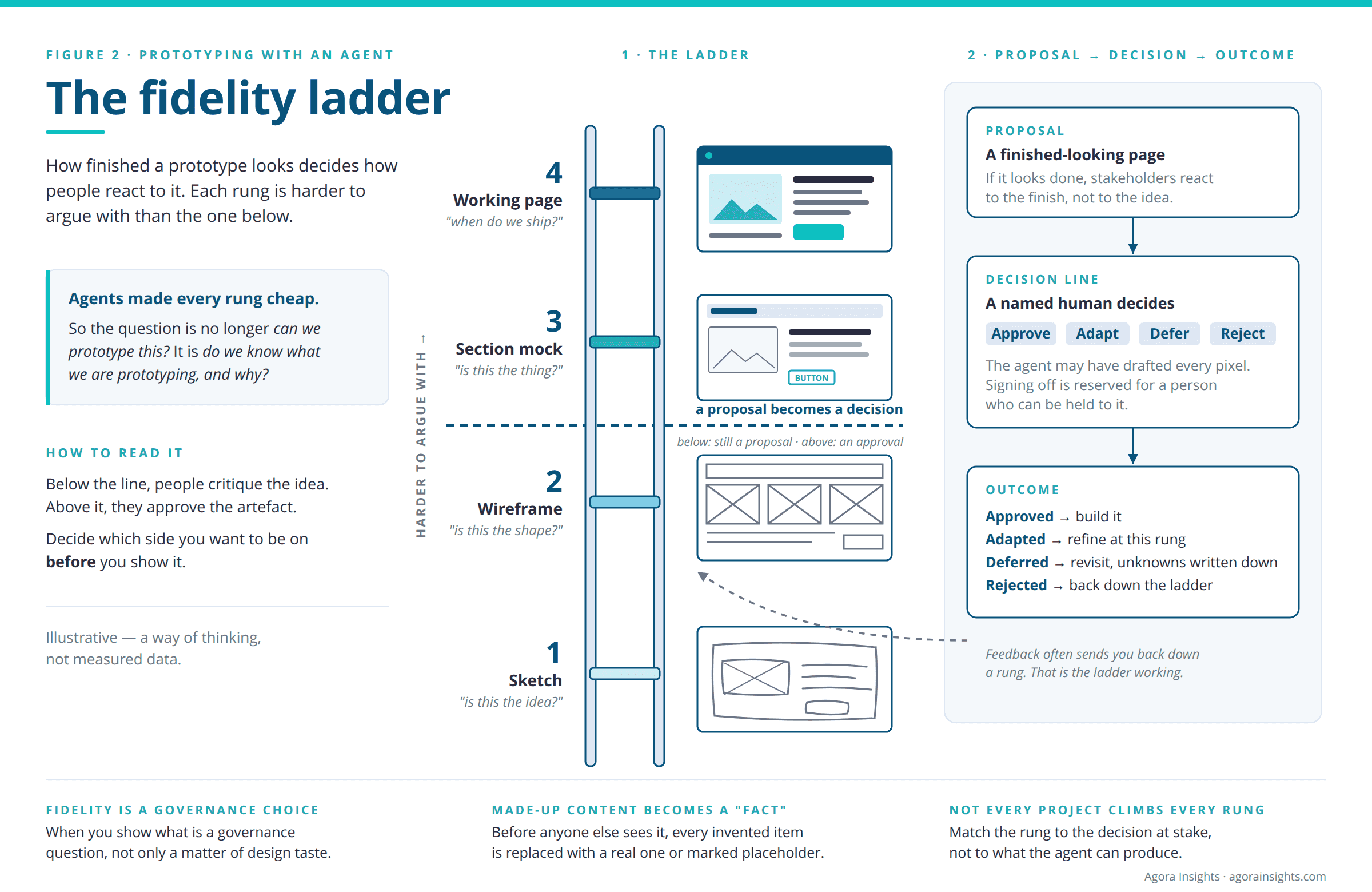
Not because analysts should build software. Because a prototype is a BABOK® technique, and agents have made it much cheaper and faster. So the question is no longer can we prototype this? The question is do we know what we are prototyping, and why?
When prototypes become cheap, how finished they look becomes a governance choice, not only a design choice:
Illustrative — a way of thinking, not measured data. The jump from wireframe to mock is where people stop talking about the idea and start approving the thing. Decide which side of that line you want to be on before you show it.
Take these three lessons with you, in any tool.
How finished it looks ends the argument
A polished screen stops being a proposal and starts being a decision. If a stakeholder sees a page that looks finished, they will react to the finish. That is a governance question — when do you show what? — not only a matter of design taste.
Made-up content becomes a “fact”
Ask an agent for a customer dashboard and it will fill it in, with fields, numbers and labels that look real. None of them came from your organisation. Two meetings later, someone will quote one of those numbers. The rule is simple: before anyone else sees it, replace every made-up item with a real one, or mark it clearly as a placeholder.
The tool pushes you toward common shapes
An agent is best at making things it has seen many times. If you do not watch for this, your new process quietly turns into a standard one. Noticing that pull, and pushing back, is analysis.
That is why the course also teaches a small set of design words: what is on a page, and how it behaves. Then an AI analyst can say exactly what they want when they ask, and exactly what is wrong when they review. Vague request in, generic page out.
“I'm amazed by how much the training has reframed my creativity and helped me to work out a structured way of building out prototypes that are rich and functional. This is an absolute asset for me as I love to visualise concepts when working with BAs, PMs and SMEs.”
Stafford Hector, Consultant, Mosaic FSITreat the agent as your least accountable stakeholder
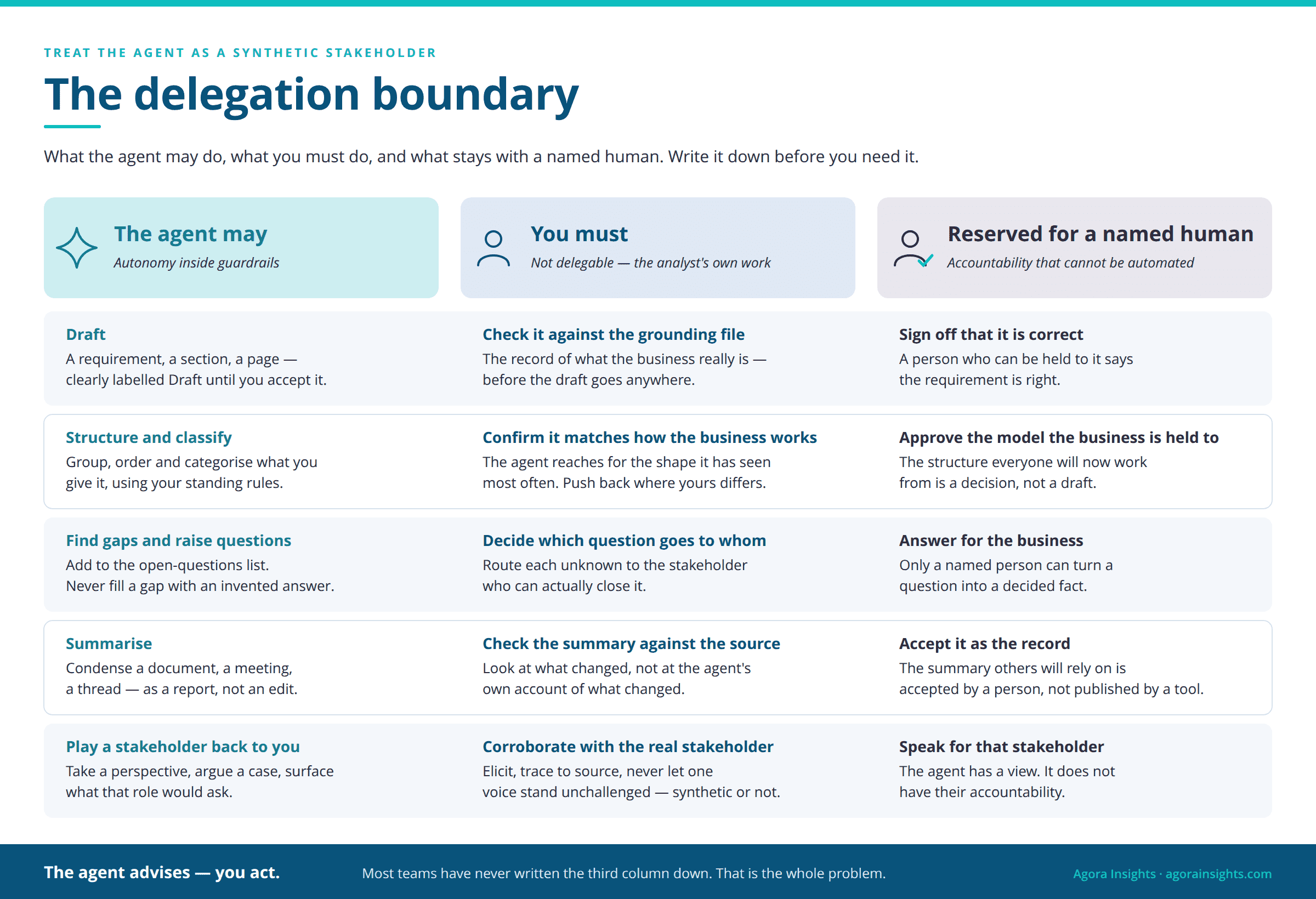
This is the idea that stuck the most: treat the agent as a synthetic stakeholder. That means a participant in the work with a point of view, but not a person.
It has a view. It produces documents and pictures. It is often confidently wrong, in ways you can learn to spot. And it has no accountability.
Some human stakeholders are like that too, and analysts already know what to do: ask, check, trace back to the source, and never let one voice stand alone. With agents, that same habit needs a written boundary, set before you need it. It has three columns, and filling them in for your own context is the exercise:
| The agent may | You must | Reserved for a named human |
|---|---|---|
| Draft a requirement, a section or a page | Check it against your grounding file — the record of what the business really is — before it goes anywhere | Sign off that a requirement is correct |
| …and a row for every kind of work the agent touches: structure, gaps and questions, summaries, and “play this stakeholder back to me”. | ||
Most teams have never written the third column down. That is the problem. It looks technical; it is really a governance question, and that is the ground business analysts have always worked on. The AI analyst simply writes it down.
The agent advises — you act.
It drafts, explains and gives feedback. A named human takes the action that matters.“Being exposed to this course prompted me to consider the ability to represent synthetically a stakeholder who may not have the capacity to respond to clarification questions, and to dispel some uncertainty in the process of understanding business needs.”
Mathieu Hemery, Principal Consultant, MosaicSteal these three habits
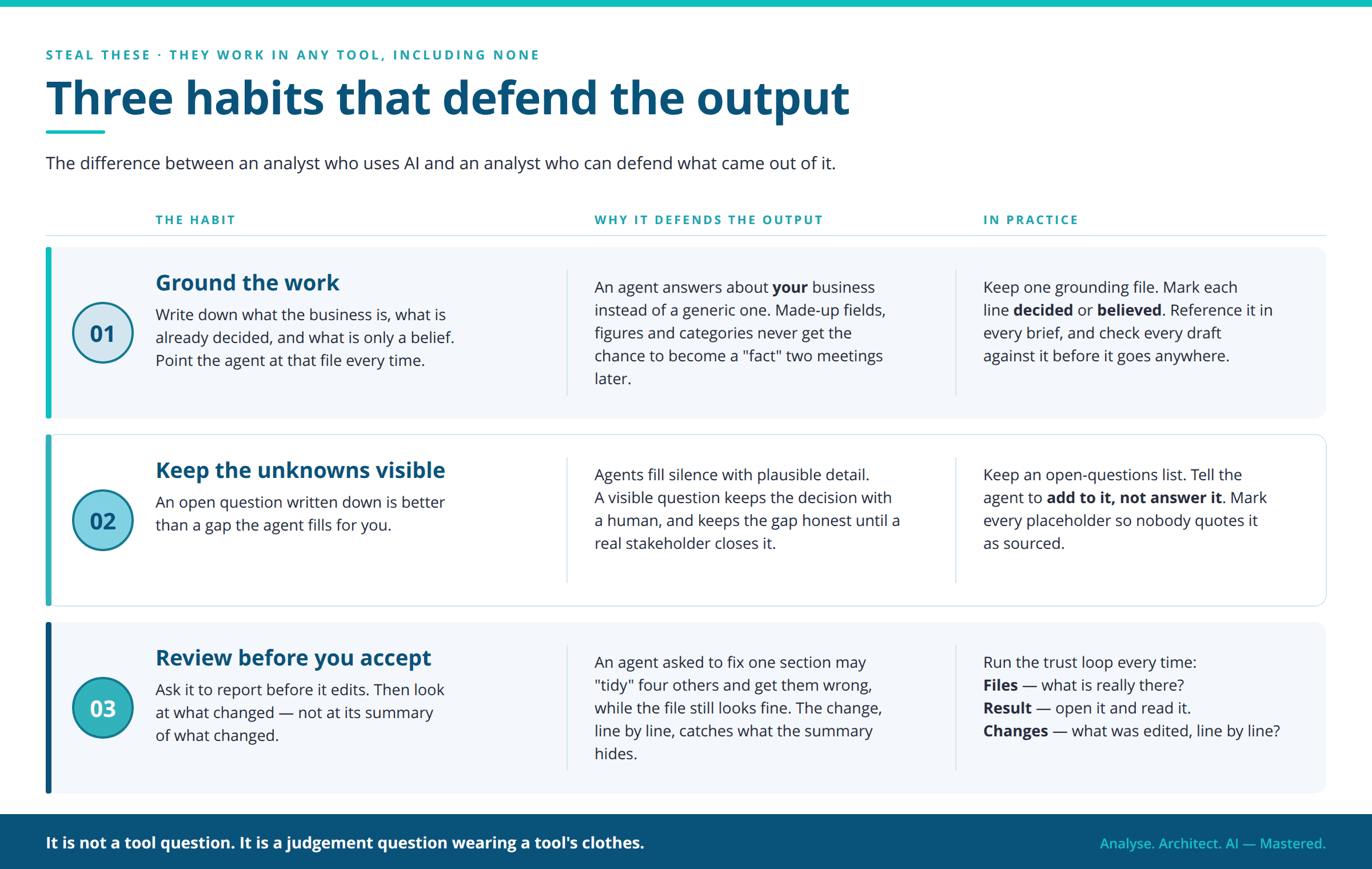
You do not need a course to start. These three habits work in any tool, and even with no special tool at all.
Three habits, starting now
Nothing here is stored — this is just for you, while you read.
Those three are the difference between using AI and being an AI analyst who can defend what came out of it. Being an AI analyst is not mainly a tool question. It is a judgement question that happens to wear a tool's clothes.
The rest — file structure, standing rules, the boundary written column by column, and the failure cases you only see in another group's course — belongs in a programme, not only in an article.
The profession is not being replaced. The AI analyst is being asked, quite suddenly, to lead the thing that was supposed to replace it.
“Learning to use Cursor to build clickable prototypes and AI agents showed me how we can automate time-consuming research and data-gathering tasks, so we can spend more time reviewing, validating and turning the outputs into useful insights… In just 20 hours, the course gave me useful tools and a much clearer understanding of what agentic AI can do.”
Chen Chen, Senior Consultant, Mosaic — on the AI Business Analyst live cohortHappy Learning,
Deirdre